

Is a Home Golf Simulator Worth It? A 2026 Cost Review
Last Updated: October 23, 2026
Quick Summary
A home golf simulator is worth it if you will use it at least twice a week and have a spare room with adequate ceiling height. For most serious golfers, the break-even point arrives within two to three years compared with range balls and indoor bay rentals.
- Plan for a room at least 10 feet wide and 12 feet deep with ceiling height that clears your driver swing.
- Budget annual software subscriptions plus a reserve for impact screens, mats, and projector lamps.
- Run break-even at your honest usage level; under three years makes it a sound purchase.
Table of Contents
- Is a Home Golf Simulator Worth It? The Honest Verdict
- Home Golf Simulator Cost: What You Actually Pay
- The Full Cost of Ownership Nobody Quotes You
- Golf Simulator vs Driving Range: Which Costs Less Per Swing?
- Golf Simulator Space Requirements: Will It Fit Your Room?
- Golf Simulator Membership Cost vs Owning Your Own
- Break-Even Math: How Often You Need to Use It
- Accuracy, Realism, and What Each Tier Actually Delivers
- Frequently Asked Questions
Is a Home Golf Simulator Worth It? The Honest Verdict
A home golf simulator is worth it if you will use it at least twice a week and have a spare room with adequate ceiling height.
Below, we break down real costs, space requirements, and the math that decides whether a home golf simulator pays you back or just collects dust.
The honest answer depends on three variables: how often you practice, what you would otherwise spend on range balls and indoor bay time, and whether your room can physically hold a full swing. Get those three right and the decision becomes simple arithmetic.
Home Golf Simulator Cost: What You Actually Pay
A home golf simulator cost breaks into two buckets: the launch monitor that reads your ball flight, and the physical build that catches it. The monitor sets your price floor and ceiling. The enclosure, screen, and mat set your build cost.
Launch Monitors: The Price Floor and Ceiling
Launch monitor pricing spans a wide gap, and the monitor you choose dictates what the rest of the build must support. Our catalog runs from a compact portable unit to a professional-grade radar system:
| Launch Monitor | Price | Best For |
|---|---|---|
| Approach R10 | $625.00 | First simulator, portable indoor/outdoor use |
| Mevo Gen 2 | $1,299.00 | Dual indoor simulator and outdoor range practice |
| LaunchBox | $3,699.00 | All-in-one system without a complicated setup |
| FlightScope X3C | $13,495.00 | Serious golfers, instructors, club fitters |
The Approach R10 is the budget entry point: portable and quick to set up. The FlightScope X3C sits at the top, with patented Fusion Tracking technology, over 50 data parameters, and 12 E6 Connect simulated courses including Pebble Beach and St Andrews.

Enclosure, Screen, and Mat Costs
The physical build is where budgets quietly expand. A proper enclosure contains mishits and protects the room. Our Flex Bay enclosure (9'H x 12'W x 6'D) runs $3,599.00 and includes Elite impact screen options, heavy-duty framing, and SkyGuard top and side protection. Add a quality hitting mat, projector, and software subscription, and the build side of the ledger can rival the monitor itself.
The Full Cost of Ownership Nobody Quotes You
Most simulator buyers budget for the launch monitor and the enclosure, then get surprised by everything that keeps the bay running. The headline package price is not the cost of ownership. Here is the full ledger, line by line, so you can plan for it instead of absorbing it.
Recurring software and subscription costs
Nearly every modern launch monitor pairs with simulation software, and most of those platforms charge either an annual subscription or a one-time license per course package. Budget for a software line item every year you own the system. The amount depends on the platform and how many courses or practice modes you unlock, but treat it as a fixed annual cost, not a one-time purchase.
Replacement wear items
Three components wear out on a schedule in a high-use bay:
- Impact screen. The screen takes every ball at full speed. Under heavy use, expect to replace it every few years. Screens range from budget poly-blend to premium woven materials, and price scales with size and material grade.
- Hitting mat. The turf under your feet compresses and the fibers mat down where you stand. A quality mat lasts longer than a bargain mat, but even a good one is a wear item in a bay that sees daily swings. Replacement mat sections are cheaper than a full mat if the wear is localized to the stance area.
- Projector. Projector lamps have a rated hour life, and a simulator projector runs far more hours than a home-theater projector. Lamp-based units need bulb replacement; laser and LED projectors cost more upfront but avoid the bulb cycle. Factor either a bulb budget or a higher initial projector price.
Installation, electrical, and room build-out
This is the line item homeowners most often underestimate. A dedicated circuit for the projector and system, added outlets, and lighting changes are real electrical costs. If you are finishing a basement or bonus room, framing, insulation, flooring, and paint come before a single club is swung. None of this is optional if the room is unfinished, and it can rival the equipment cost in a full build-out.
Electricity
A simulator draws power for the projector, the launch monitor, the computer or console running the software, and the room lighting. It is not a major utility line item compared with heating or cooling, but it is not zero either, and a room that needs extra heating or cooling to be comfortable adds to the monthly figure.
Maintenance and the occasional repair
Beyond wear items, plan for the occasional repair: a sensor that needs service, a net or frame component that takes a hit, or a computer that needs upgrading to keep up with newer software. None of these are annual certainties, but a small maintenance reserve keeps a single failure from feeling like a crisis.
The good news: these costs are spread over years, not paid upfront. Budget for them from day one and the simulator never becomes a surprise expense.
Golf Simulator vs Driving Range: Which Costs Less Per Swing?
Golf simulator vs driving range comes down to volume. A bucket of range balls costs money every single visit, forever.
Do the math on your own habits. If you hit the range twice a week and pay for a large bucket each time, that is roughly a hundred sessions a year.
The comparison flips once you factor in convenience. Range trips cost time: driving there, waiting for a bay, driving back. A simulator costs a walk downstairs.
Golf Simulator Space Requirements: Will It Fit Your Room?
Golf simulator space requirements are the make-or-break factor. You need enough ceiling height for a full swing, enough width for the enclosure, and enough depth for the ball to travel before it hits the screen.
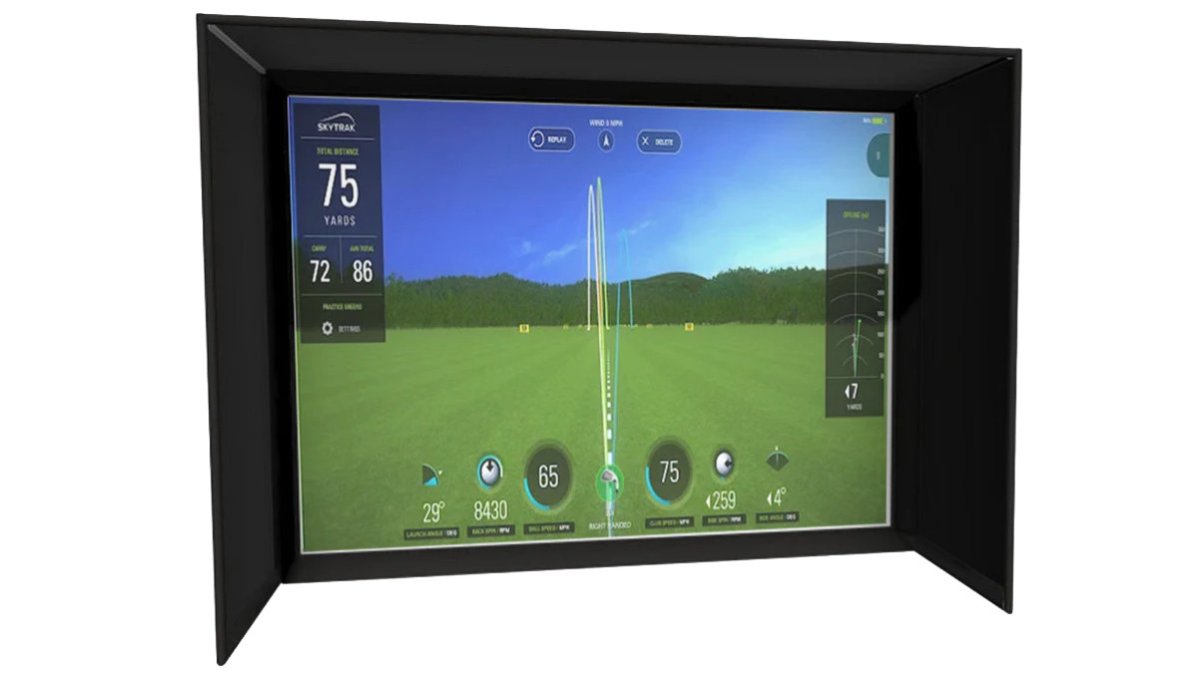
As a working rule, plan for a room at least 10 feet wide and 12 feet deep, with ceiling height that clears your swing with the driver in hand. The Flex Bay's 9-foot height, 12-foot width, and 6-foot depth gives you a concrete reference for a dedicated bay.

Low ceilings in one corner of a basement are common. Measure ceiling height at the point where you will actually stand, not at the room's highest point.
Golf Simulator Membership Cost vs Owning Your Own
Golf simulator membership cost at a commercial venue is a recurring fee with no end date.
Owning flips the equation. Once the system is installed, your marginal cost per session is essentially zero.
There is a lifestyle difference too. Commercial bays require booking, travel, and sharing space. A home simulator is available at 6 a.m. or 11 p.m., in any weather, without a reservation.
Break-Even Math: How Often You Need to Use It
Break-even is the number that settles the argument, but only if you run it at your actual usage level. A single formula hides the fact that payback swings wildly between a once-a-week player and a daily practicer. Here is how to model it at three usage tiers so you can find your own number.
Step 1: Total your all-in cost
Start with the full installed cost, not the launch monitor price. Add the monitor, enclosure, screen, mat, projector, software license, and any electrical or room build-out from the ownership section above. That total is the number you are trying to pay back.
Step 2: Total what you spend now
Add up your current annual golf-practice spend: range buckets, indoor bay rentals, simulator memberships, and lessons that a simulator might replace. Most golfers underestimate this figure. Track it for a month and multiply, or pull a year of card statements and add the golf line items.
Step 3: Divide, then stress-test at three usage levels
The raw break-even is total installed cost divided by annual practice spend. But the more useful exercise is to model payback at different session counts, because your usage will not stay constant:
- Casual tier, about once a week. Roughly 50 sessions a year. At this volume, a premium build rarely pays back on practice savings alone within a reasonable horizon. The purchase is justified by entertainment and convenience, not by replacing range spend. Be honest with yourself if this is your real pattern.
- Committed tier, two to three times a week. Roughly 100 to 150 sessions a year. This is where the math starts working. The recurring spend you avoid each year is large enough that a mid-tier build typically pays back within a few years, and a budget build can pay back faster.
- Serious tier, four or more times a week. 200-plus sessions a year. At this volume, even a premium build pays back relatively quickly, and the marginal cost per session drops toward the cost of electricity and wear items. This is the profile that justifies the top-tier monitors with full club and ball data.
Step 4: Compare against the alternatives you would actually use
The simulator is not competing with a free round of golf. It is competing with every range bucket, indoor bay hour, and membership fee you will otherwise pay for the next decade. If you would not actually buy those range buckets and bay hours, do not count them as savings, count only the spend the simulator genuinely replaces.
Step 5: Add the non-dollar value
Some of the return does not show up in the ledger. Year-round access in any weather, practice at 6 a.m. or 11 p.m. without a reservation, and the ability to hit balls during a 20-minute break at home all have real value to a golfer who would otherwise practice far less. If the dollar math lands just short of break-even but the convenience value is high, the purchase can still be worth it, as long as you know that is the trade you are making.
Accuracy, Realism, and What Each Tier Actually Delivers
Accuracy scales with price, but the jump that matters most is between entry-level and mid-tier units. Budget monitors deliver solid ball flight and shot data for practice and entertainment.
Realism depends on the software and screen as much as the monitor. The FlightScope X3C, for example, pairs 50-plus data parameters with 12 E6 Connect courses, so practice and play happen in the same system.

What most buyers miss: the top tier is not about better graphics. It is about data depth for players who want to diagnose their swing, not just hit balls into a screen.
Frequently Asked Questions
How much does a home golf simulator cost to set up?
It depends on the tier. A budget entry setup can start with a portable launch monitor like the Approach R10 at $625, while a mid-range all-in-one system such as the LaunchBox runs $3,699. A premium enclosure like the Flex Bay adds $3,599, and a professional-grade FlightScope X3C is $13,495. Add a projector, mat, and software, and most complete home golf simulator builds land somewhere between a few thousand and well over $15,000 depending on accuracy and realism.
How often do you need to use a golf simulator for it to be worth the cost?
Run the break-even math against what you currently spend. If you pay $40 per range session and $60 per indoor bay hour, a $5,000 setup breaks even after roughly 50 to 80 sessions. Golfers who practice twice a week hit that inside a year. If you play or practice less than once a month, the numbers rarely work in your favor, and a membership at an indoor facility usually costs less.
What space do you need for a home golf simulator?
Plan for at least 10 feet of ceiling height, 12 feet of width, and 8 to 10 feet of depth from the screen to your stance. The Flex Bay enclosure measures 9 feet high by 12 feet wide by 6 feet deep, which suits most basements and garages. You also need swing clearance behind and beside you, so measure your driver arc before committing. Low-ceiling corners and support beams are the most common reasons a room fails.
Can a home golf simulator actually improve your game?
Yes, mainly through repetition and shot data. Launch monitors report ball flight, club path, and distance, so you can see what changed between swings instead of guessing. Year-round indoor practice means your swing does not degrade over winter. The caveat is accuracy: budget monitors give useful but less precise data than professional-grade units, so work on fundamentals and consistency rather than chasing decimal-point precision.
Is a golf simulator cheaper than a membership at an indoor facility?
Over several years, ownership often wins for frequent players. Indoor bay rentals commonly run $30 to $60 per hour, and a winter of weekly sessions adds up fast. A $5,000 home setup used twice a week for three years works out to roughly $16 per session, and the equipment stays. Casual players who visit a facility a few times a season will spend less on membership than on a full build.
Deciding whether a home golf simulator is worth it comes down to your room, your habits, and your budget. Game Room Products curates simulator builds with trusted manufacturers, from the portable Approach R10 to the professional-grade FlightScope X3C, plus enclosures like the Flex Bay that protect your space. We help you plan the whole room, not just the hardware. Build your game room with us and get a simulator that earns its place.
